

Guides
Practical guideGetting started on Stake: settings worth knowing
Your account is ready: switch to English, display your balance in euros and find the Vault and your VIP rewards.
By The Gambling Desk · Published · Verified
Your account is ready: time for the settings that make Stake easier to use. Interface language, a balance displayed in euros, the Vault and your VIP area… Here is where to find the useful features on your first visits.
Language
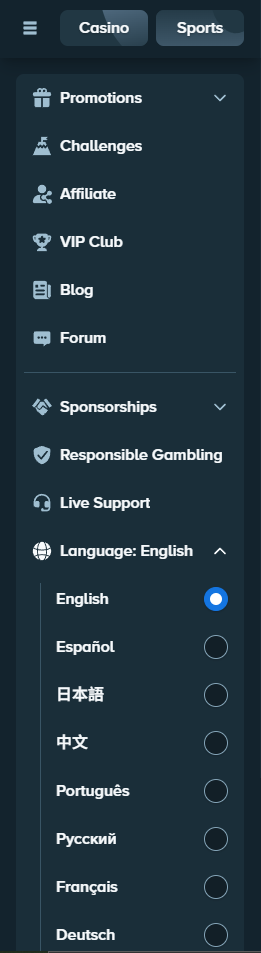
Choose the interface language in the side menu.
Wallet
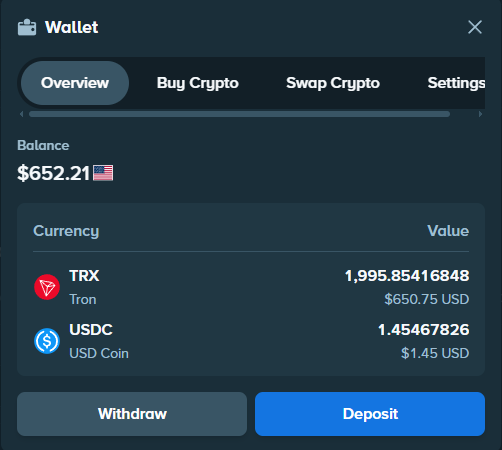
Check your crypto balance and its value in euros.
Security
Enable 2FA before moving or storing funds.
VIP
Find your rewards and track your VIP rank.
Choose your interface language
Open the sidebar, scroll down to Language and choose English. On mobile, open the main menu first. Reload the page if a screen still shows the previous language.
Display your balance in euros
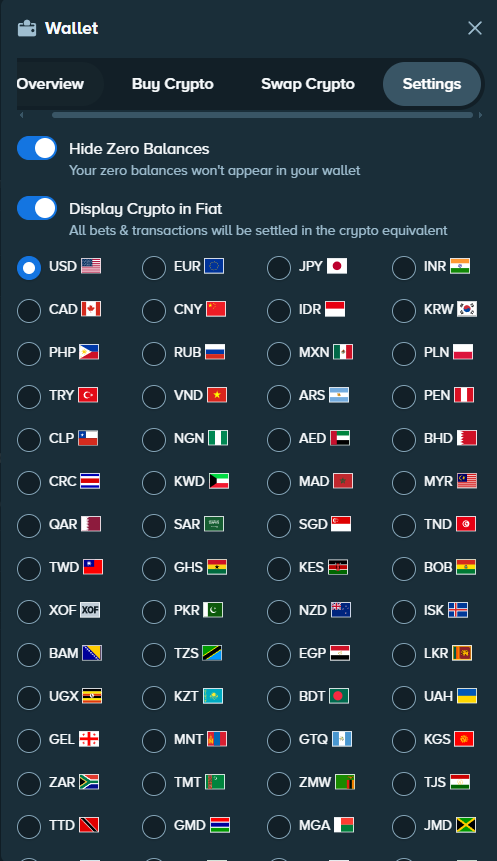
In the Wallet, open Settings, enable Display Crypto in Fiat, then choose EUR. You will see a euro equivalent alongside your crypto. USD and other display currencies may also be offered.
This setting changes the display: your assets stay in their original cryptocurrency and their euro value moves with the exchange rate.
Move part of your balance into the Vault
The Vault lets you separate some funds from the balance immediately available to play. Open Account → Vault, choose the currency, then the amount to move.
To return these funds to your balance, make the reverse transfer. The Vault uses your account protections, including password, email and 2FA.
Find and claim rakeback
The route is short: VIP → Rakeback. You can see the amount accumulated and the option to claim it. This benefit becomes available from Bronze rank.
Rakeback is calculated from your bets and the games’ theoretical house edge. It works separately from Weekly and Monthly, the weekly and monthly bonuses in the VIP programme.
Follow your VIP rank
Your VIP area shows a rank and a progress bar. It moves with wager, the total qualifying amount bet, rather than deposits.
To find the volume remaining until your next rank, enter your level and percentage in the VIP calculator. You will also find the full rank chart there.
Stay in control of your account
Confirm your email address and enable 2FA in security settings. Use a password reserved for Stake and keep your login codes private.
You can now find your settings without searching through every menu. To fund the Wallet, head to the deposit guide; to send funds out, use the withdrawal guide.
Frequently asked questions
Does displaying euros convert my crypto?
No. It is an indicative equivalent; the amount of cryptocurrency you hold stays the same.
Are Vault funds available to play?
They first need to be transferred from the Vault to your balance.
Where is the transaction history?
In the Wallet, which brings together balances and the history of deposits and withdrawals.