


Guided registration
How to sign up on Stake
By The Gambling Desk · Published · Verified
Create your account to find the casino, Stake Originals and sportsbook in one place. An email address, a password and the code tgd: here are the steps to get started.
Stake Registration Assistant
Having trouble accessing Stake or completing registration?
Developed and hosted by The Gambling Desk, this assistant guides you step by step in French or English without creating the account for you. TGD does not retain any data from its use.
Open the Telegram assistantYou will never be asked for a password, 2FA code, recovery phrase, private key or transfer of funds.

Get ready to sign up
Have an email address you can access and choose a password used only for this account. Registration is open to people of the required age in territories accepted by Stake.
Open the Stake registration form
The sign-up button takes you to Stake. Open the account creation form to start entering your details.
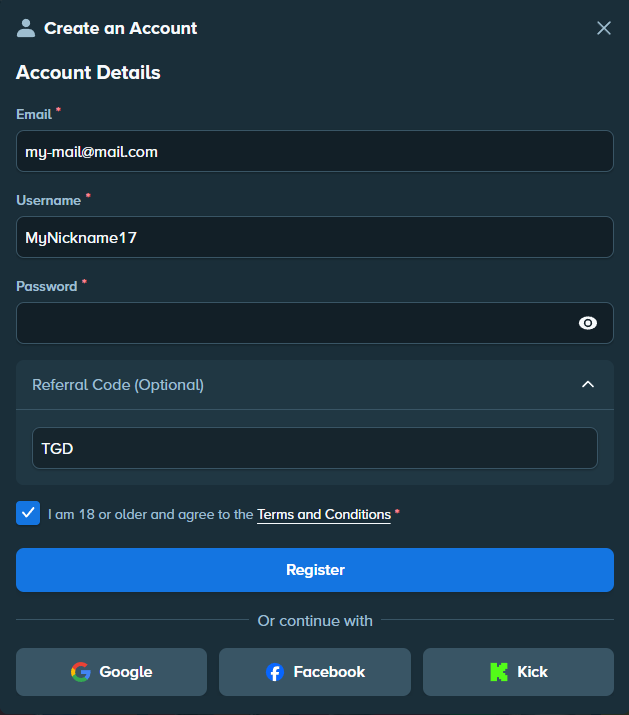
Enter your details
Enter your email, password and the requested information. Use accurate details, which will also be used for account verification. Read the terms shown, then follow the confirmation sent by email.
tgd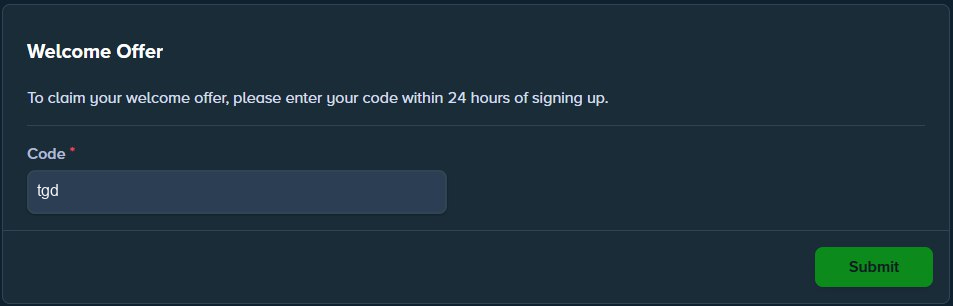
Add the code tgd
Enter tgd in Referral Code before confirming. If the code is already there, leave it in place.
The field may then be hidden or locked depending on the interface. A code entered when creating your account does not need to be entered again.
Already have an account?
Open Offers or Welcome Offer. If adding a code is still available, enter tgd, then read the displayed terms before confirming. The options and time limits depend on the account.
Protect access to your account
Confirm your email and enable the protections available in settings, especially 2FA. Keep passwords and login codes private, including when asking for help.
Make your first deposit
Your account is ready: the first deposit guide covers buying through the Wallet and sending crypto from a compatible service. You can also start by customising the interface, including the language and balance display.
Frequently asked questions
How long does registration take?
The form usually takes a few minutes. Email confirmation and any account checks may take longer.
Which code should I enter?
The code tgd, in the Referral Code field when it is available.
Can I add the code after creating an account?
Check Offers or Welcome Offer: availability depends on the time limit and terms shown in your account.
Where can I get help if registration gets stuck?
The Telegram assistance section on this page guides you through the process. For personal verification or an account issue, contact official Stake support. No assistant needs your password or 2FA codes.